Sales pipeline automation uses software rules to move leads, tasks and data through your stages without manual handoffs. For a lean team, five automations do most of the work: enrichment at capture, routing with response-time alerts, stage-based follow-ups, stalled-deal alerts and automatic activity logging. Keep them rule-based at first, and pilot AI only once your data passes basic quality checks.
Which automations should you switch on first?
If you only have time to build a few things this quarter, build these five. Each one plugs a spot where deals quietly leak.
- Enrichment at capture. Every new lead gets verified contact and company details the moment it enters your system, so the first touch can happen right away, inbound or outbound.
- Routing with response-time alerts. Territory or ICP rules assign the owner, and an alert fires if nobody touches the lead in time.
- Stage-based follow-ups. A stage change creates the next task or sequence step, so reps stop relying on memory.
- Stalled-deal alerts. A deal with no activity for a set number of days triggers a nudge to the owner, then an escalation.
- Activity capture. Calls and emails log themselves. According to Ebsta and Pavilion, 44% of the contacts sellers interact with are never recorded in the CRM. A forecast built on missing activity is a guess.
Start with the tasks that happen often and need little judgment. Routing, field defaults and activity logging pay back fast and rarely go wrong.
How do you set up pipeline automation step by step?
The order matters more than the tools. Automating a process nobody has standardized just produces inconsistent data faster, so agree on the process before you build.
- Define stage entry and exit criteria. Write down what must be true for a deal to enter or leave each stage, and which fields are required.
- Map triggers to actions. A form fill triggers enrichment, then routing. A stage change triggers a sequence. A time delay triggers a follow-up task.
- Set rules for validation, duplicates and enrichment. Decide how quickly a record must be enriched and how duplicates get merged.
- Limit automatic writes. Let automation overwrite a field only when it is highly confident. Everything else goes to a review queue.
- Pilot two or three workflows. Record your baseline numbers first, and write the rollback plan before you switch anything on.
- Name owners and dashboards. Decide who owns each workflow, what its response-time target is and where you will watch it.
Keep the first pilot boring. A routing rule with a response-time alert teaches your team more than an ambitious AI workflow does.
What data hygiene does automation need?
Automation amplifies whatever you feed it. A clean structure gives you reliable reporting. A messy one gives you mistakes at scale. Respondents to a RevOps survey put the data foundation first: enrichment at capture, regular refreshes, dedupe rules and clear response times.
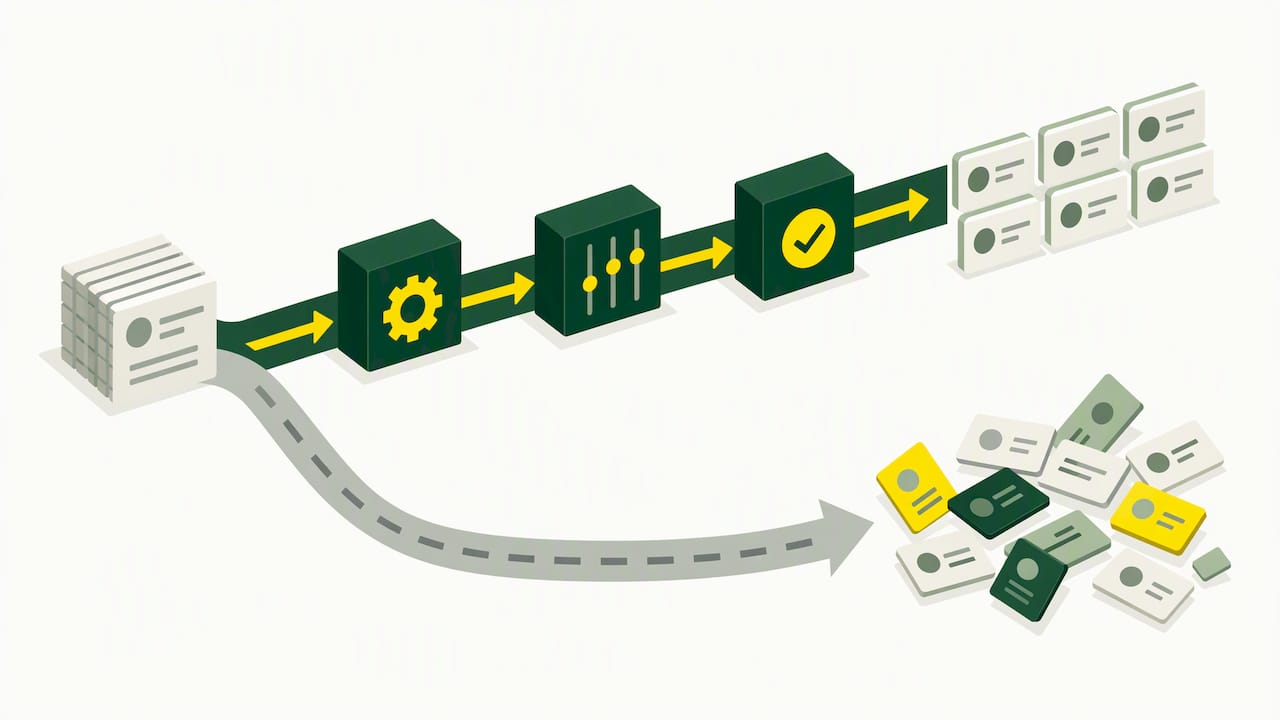
By pipeline structure we mean the objects you track, what each stage means, who owns each record, and when a second pipeline is justified, for example for renewals. Put these in place:
- One system of record. Every tool reads from and writes to the same CRM, so nobody debates which number is right.
- Enrichment at capture plus scheduled refreshes. Contact data goes stale as people change jobs, so refresh it on a schedule and merge duplicates as you go.
- API integrations over CSV files. Manual exports and imports create lag and errors. Use them only as a last resort.
- Confidence thresholds for AI-updated fields. A practical rule is to write high-confidence data automatically, queue mid-confidence suggestions for review and block the rest.
- A clear owner. Someone owns field definitions, tool choices and cost. Otherwise every team adds its own tools and rules.
Which workflow templates can you copy?
Adapt these to your own stages and tools. They are simple on purpose.
Inbound capture
- A form submission creates a lead record.
- Enrichment adds job title, company size and a verified email.
- A routing rule assigns an owner.
- The owner gets a task and a draft first email within your response-time target.
Outbound sequence timing
- Day 0: a personalized email that refers to something real, such as a recent hire, funding round or product launch.
- Day 3: a LinkedIn connection request or a short follow-up email.
- Day 7: a second email with a different angle or proof point.
- Day 14: a call, then a final email if there is still no reply.
A reply or a booked meeting on any channel should stop the rest of the sequence.
Routing rules
- Territory: leads in the Nordics go to the Nordic account executive.
- Company size: companies above your enterprise threshold go to the senior team.
- Product line: leads tagged with a specific product go to its specialist.
- Response time: if nobody touches a lead within your target window, notify the owner, then the manager.
Stalled deals
- Flag any open deal with no logged activity for longer than your chosen number of days.
- Create a re-engagement email draft and a task for the owner.
- If nothing happens within a few days, escalate to the sales manager.
For more on the outbound side, see how to personalize outreach without manual research and how to automate sales workflows with AI.
How do you measure, pilot and scale automation?
Track a short list of numbers and review them on a fixed rhythm:
- Pipeline coverage against target
- Conversion rate by stage
- Time to first touch
- Share of records that are fully enriched
- Time saved per rep
Keep pipeline and forecast reviews apart. Pipeline management is about coverage and creating opportunities, while forecasting is about confidence in this quarter’s commit. Each needs its own meeting and agenda.
Run every pilot against a baseline and, where you can, a control group, and decide in advance what counts as a pass. Expand an AI workflow only when its confidence thresholds hold and the improvement shows up in the numbers.
How do you handle several languages?
Selling across borders breaks automation in quiet ways. An English sequence sent to a prospect in Germany or Spain reads like a template, and replies suffer. Treat language as a data field from the start.
Capture each prospect’s country and preferred language during enrichment and store both on the record. Then use that field everywhere:
- Write in the prospect’s language. Each person should get copy that reads as if it were written in their language, not translated word for word from English.
- Keep it in one campaign. You don’t need a separate sequence per market. One campaign can branch on the language field, which keeps reporting and maintenance in one place.
- Stay consistent across channels. If the LinkedIn message is in German, the email that follows should be too. Mixed languages make outreach look automated.
- Compare reply rates by language every month. One weak language usually points to a copy problem, not a market problem.
How do you get your sales team to adopt automation?
Most automation projects fail because of people, not software. Reps who feel watched or replaced will quietly work around your workflows, and your data gets messy again.
Explain the problem in the team’s own terms. Every hour spent on data entry and chasing follow-ups is an hour not spent selling, so present automation as time handed back, not as extra process.
A rollout that works for small teams:
- Involve a few reps early. Let two or three sellers help design the pilot workflows. They will spot problems you can’t, and they become your internal champions.
- Explain the why and the how. One short session per workflow: what triggers it, what the rep has to do and where to flag errors.
- Name one person for questions. One owner and one visible channel for feedback.
- Share early results. Show the improvement in time to first touch after the pilot, with real numbers against your baseline.
- Keep an off switch. Reps need a way to pause or correct an automation without filing a ticket.
Retrain whenever you change a stage definition or add a workflow. Short refreshers beat one big launch session that everyone forgets.
Start small and keep it simple
Most small teams don’t need more tools. They need cleaner records and two or three automations that give sellers their afternoons back. Fix data hygiene, switch on routing and follow-up tasks, and you will usually see faster first touches and fewer dropped handoffs within a few weeks. Bigger gains from AI come later, through careful pilots. Keep the governance light: owners, response-time targets and one dashboard.
How lemonreach fits in
lemonreach covers the outbound part of this playbook in one place:
- AI prospecting that finds companies and contacts that match your ICP, with verified emails.
- Enrichment that adds LinkedIn and news context to each lead, so the first email has something real to say.
- Sequences across email, LinkedIn and calls, written in each prospect’s own language, with many languages in a single campaign.
- Integrations with your CRM and Aircall, so activity lands where your team already works.
Want to see it on your own pipeline? Book a demo, or compare plans on the pricing page.