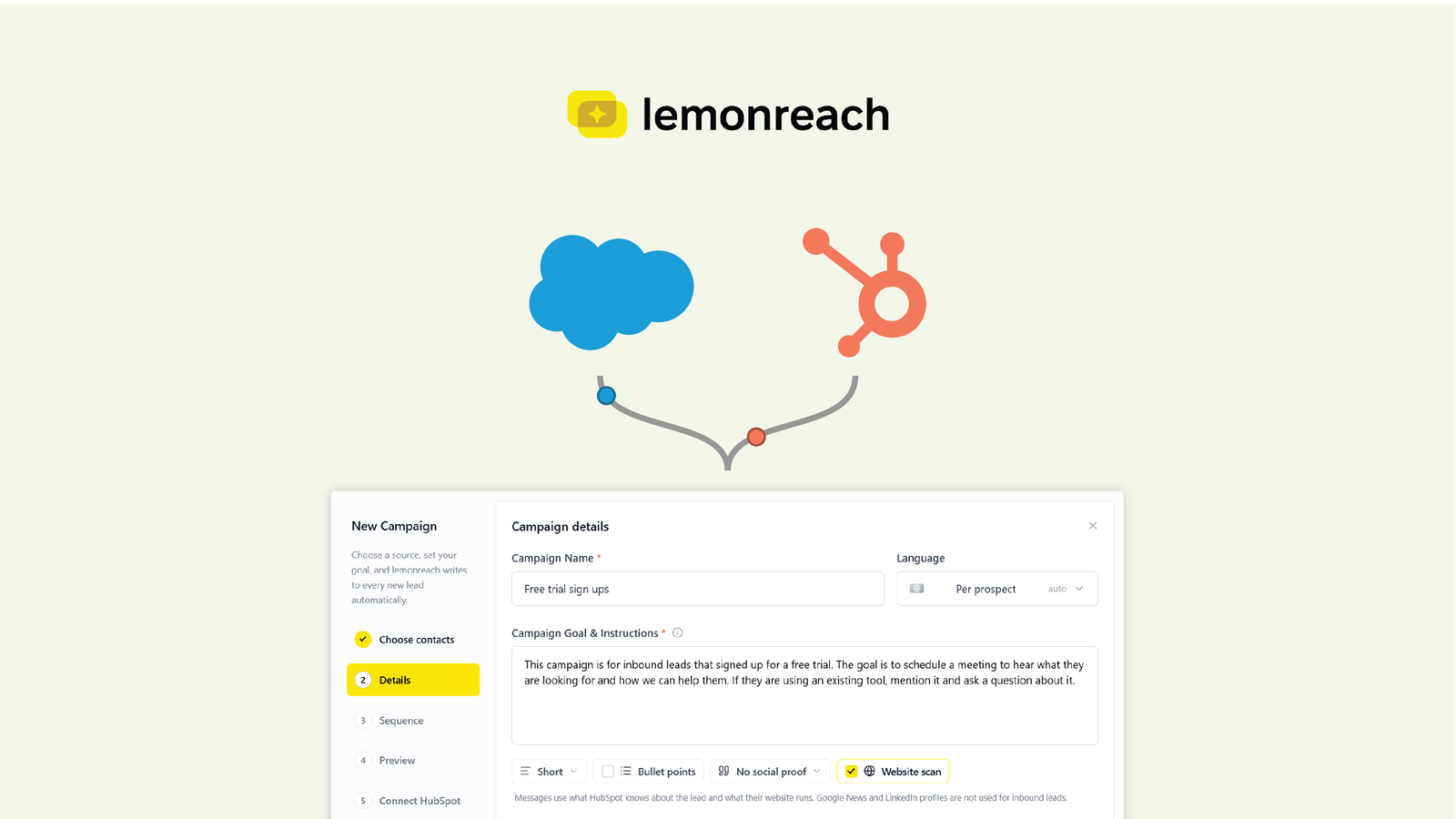
Inbound leads convert best when a person-like follow-up reaches them quickly, mentions something specific about their situation and uses more than one channel. The default setup in most CRMs does the opposite: a generic, email-only workflow that looks like marketing mail. You can fix this by sending leads from HubSpot or Salesforce into a multichannel sequence that stays in sync with your CRM.
Why does inbound lead follow-up underperform?
A free trial sign-up or a content download feels like a warm lead. In practice it is a genuine buying signal, but not yet a conversation. They did not ask to speak to sales, and most have never heard of you beyond the page they just visited, so it still takes active work to move them forward.
Timing matters too. A widely cited analysis of web leads by InsideSales.com found that calling within five minutes made a lead 21 times more likely to qualify than calling after 30 minutes. The data comes from one vendor’s platform and was never published in a journal, so treat the exact multiple as directional. The direction is hard to argue with: the longer a lead waits, the colder it gets.
Then there is what actually gets sent. Most CRM workflows have the same shape:
- An email thanking the lead for signing up
- A second email with tips or a link to more content
- A third email asking if they want a demo
Every step is generic and every step is email. Recipients have seen this pattern a thousand times and file it under marketing mail. It gets skimmed, ignored or unsubscribed from, and the lead you paid to attract goes cold.
What makes inbound follow-up work?
Four things separate a follow-up that gets answered from one that gets ignored.
- Context. The message should reflect why the lead is in your system. Someone who started a free trial needs a different message from someone who downloaded a guide.
- A clear goal. Pick one outcome per campaign, usually a booked call, and write every step toward it.
- Relevance about the lead’s own setup. A line about the tools they use today shows you did your homework, and it opens a question they can answer in one sentence.
- More than one channel. An email, a LinkedIn message and a phone call from the same sender feel like a person. Three emails feel like a drip campaign.
How do you send leads from HubSpot or Salesforce into lemonreach?
The trigger lives where you already work. Most companies already have workflows for key events such as a free trial registration, a content download or a demo request. You add one step to the workflow that sends the contact to lemonreach.
In HubSpot, workflows have a webhook action that posts contact data to an external HTTPS URL when a contact enrolls. Add it at the point in the workflow where the lead should move to sales follow-up.
In Salesforce, the simplest route is an outbound message. You create it in Setup with the endpoint URL and the fields to send, then add it as an action in a Flow, so a new lead or a changed field triggers it. Guides to Salesforce webhook options cover the alternatives, such as HTTP callouts and platform events.
Once the contact arrives in lemonreach, it enters an inbound campaign. The contact stays synced with your CRM, so emails, calls and LinkedIn activity show up on the record and your team sees everything in one place. This requires the HubSpot or Salesforce integration to be connected.
What should an inbound campaign say?
Every inbound campaign in lemonreach gets its own context and instructions. You describe who the leads are, what the goal is and what the messages should do. For example:
This campaign is for leads who signed up for a free account. The goal is to book a call to hear how they work today. If they already use a tool in this category, mention it in the email.
That short brief replaces a template. Each message is written for the individual lead, in line with those instructions. This is the same idea behind lemonreach sequences, where the aim is to personalize at scale instead of sending the same text to everyone.
Because an inbound campaign works like any other lemonreach campaign, it can include email, phone and LinkedIn steps. A trial user who ignores two emails may still pick up a call or accept a connection request.
How does a website scan make the email more relevant?
The last line of that example brief is where the website scan comes in. For each lead, lemonreach can scan their website for specific tools you define in advance.
Say you sell A/B testing software. A lead signs up for a trial. The scan checks their site and finds that they already run a competing testing tool. Your email can now say so:
I saw you already run experiments with [tool]. What made you start a trial of ours?
That is a better opening than any generic line about “optimizing conversion”. It shows you looked at their setup, it creates relevance, and it asks a question that is easy to answer. If the scan finds no tool at all, that is useful too: you can adjust the angle toward getting started instead of switching.
You can use the same approach for any product with a detectable footprint on a website, such as analytics, chat, consent management, payments, e-commerce platforms or marketing automation.
How does this compare with a standard CRM workflow?
| Standard CRM workflow | lemonreach inbound campaign | |
|---|---|---|
| Channels | Email only | Email, phone and LinkedIn |
| Message | Same template for every lead | Written per lead from your brief |
| Relevance | Based on form fields | Can reference tools found on the lead’s website |
| Goal | Often implicit | Stated in the campaign instructions |
| CRM | Native | Stays synced, so activity lands on the record |
You do not have to throw away your existing workflows. Keep them for lead scoring, routing and nurture of leads who are not ready. Use the webhook step to hand over the leads where a human-sounding, multichannel follow-up is worth the effort.
What should you measure?
Compare an inbound campaign against your current workflow on a few numbers:
- Reply rate on the first two touches
- Share of leads that book a call
- Time from sign-up to first contact
- Conversion from booked call to opportunity
Start with one trigger, for example free trial sign-ups, and run it alongside the old workflow for a few weeks. Move more triggers over once the numbers justify it.
For related reading, see how to automate sales workflows with AI and how to build sales pipeline automation for a lean team.
How lemonreach fits in
lemonreach is an AI SDR platform. Inbound campaigns add the missing piece for leads that come to you:
- Webhook intake from HubSpot or Salesforce workflows, with the contact kept in sync with your CRM.
- Campaign context and instructions that tell lemonreach who the leads are and what to achieve.
- Website scan that looks for the tools you care about on each lead’s site.
- Multichannel sequences across email, phone and LinkedIn.
Want to see it on your own inbound flow? Book a demo, or compare plans on the pricing page.